Hello Baochip!
Baochip is the latest open/trustable hardware venture by Andrew "bunnie" Huang (wikipedia.org).
Here’s the official website:
But I recommend bunnie’s write-ups on his blog as an introduction:
-
Baochip-1x: A Mostly-Open, 22nm SoC for High Assurance Applications (bunniestudios.com)
-
BIO: The Bao I/O Coprocessor (bunniestudios.com)
What makes the Baochip1x special is that it is an SoC (system on chip) with:
-
A RISC-V core
-
An MMU (memory management unit, allows for hardware support of virtual memory, a feature normally reserved for "real" computers)
-
I/O coprocessor (BIO)
-
Hardware support for a bunch of security-focused features such as a TRNG (true random number generator), AES encryption, and a ton of cryptographic hashes
-
It is intentionally inspectable with inexpensive infra-red cameras so you can visibly verify the structure of the chip yourself! (See Infra-Red, In Situ (IRIS) Inspection of Silicon (bunniestudios.com)
It was made specifically to be able to run Xous, a microkernel OS written in Rust originally written for bunnie’s Precursor device. See Xous 0.10.0 - Introducing Baochip-1x Support (crowdsupply.com).
More about Xous here: https://betrusted.io/xous-book/
I’m mostly here because I think bunnie is great and I’m interested in RISC-V as a platform.
(I’ve been a fan of bunnie since his On MicroSD Problems (bunniestudios.com) investigation and write-up, but especially after I read his book The Hardware Hacker: Adventures in Making and Breaking Hardware in 2019.)
The Dabao evaluation board
My Dabao board with the Baochip1x arrived today from Crowd Supply.
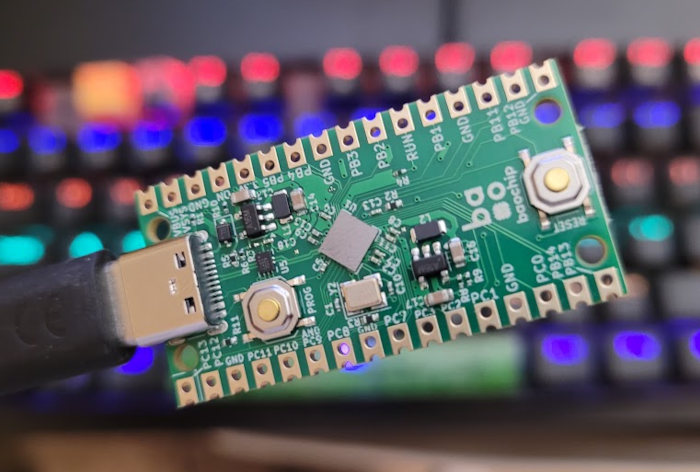
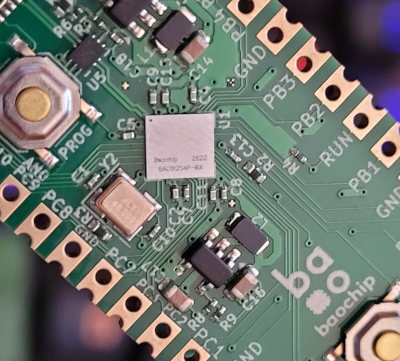
Here’s a crummy image of the chip itself (so tiny and so shiny!):
Let’s connect to it!
I found this pair of READMEs in the Xous repo most helpful:
"Regardless of the board, the bao1x chip comes from the factory programmed with boot0 and boot1 stages. The code for these can be found in bao1x-boot/."
"boot1 contains a USB driver, serial-over-USB driver, and serial driver capable of accepting code updates in the form of .u2f files or serial commands. It also contains a small command terminal for managing configurations, keys, and device lifecycle state."
"Baochip relies primarily upon a "virtual serial console", which is a USB CDC-ACM device. In short, when you plug a Baochip into your computer, you will get something similar to either a COM port (on windows) or a tty node (on Linux)."
Sure enough, I plugged it into my Linux PC and there it is:
$ sudo dmesg
...
[41412.220396] usb 3-4: Product: Baochip-1x
[41412.220400] usb 3-4: Manufacturer: Baochip
[41412.220404] usb 3-4: SerialNumber: YH1DTN
[41412.307486] usb-storage 3-4:1.2: USB Mass Storage device detected
[41412.307677] scsi host9: usb-storage 3-4:1.2
[41412.307824] usbcore: registered new interface driver usb-storage
[41412.308600] cdc_acm 3-4:1.0: ttyACM0: USB ACM device
...
Using GNU screen is how I’m used to speaking to serial devices and
that’s what the README recommended as well. Depending on your distro’s
setup, it may be easiest to simply run screen as root.
Without root:
$ screen /dev/ttyACM0 1000000
[screen is terminating]
With root:
$ sudo screen /dev/ttyACM0 1000000
(terminal goes blank - we're connected!)
The boot1 REPL (which we can think of here as nothing more than a simple command-line interface) presents a completely blank terminal with no prompt. Hit Enter or trying typing a command and you’ll see a reply if everything’s working:
Command not recognized:
Commands include: altboot, audit, boot, boardtype, bootwait, echo, idmode, ifr, localecho, lockdown, paranoid, reset, self_destruct, skipping, uf2
The easiest commmand to use is echo:
echo Hello World!
Hello World!
Some of the others are mysterious or scary like paranoid or even self_destruct.
Since the source for both boot stages are in the Xous repo, I cloned it and searched
for the REPL commands. Sure enough, I found them in: xous-core/bao1x-boot/boot1/src/repl.rs.
Here’s the echo command:
"echo" => {
    for word in args {
        crate::print!("{} ", word);
    }
    crate::println!("");
}
And self_destruct is not a joke:
"self_destruct" => {
    if !matches!(args.as_slice(), [s] if s == "void_my_warrantee") {
        return Err(Error::help(
            "Usage: 'self_destruct void_my_warrantee'. This PERMANENTLY wipes the chip and bricks it. No returns or exchanges are allowed after executing this command.",
        ));
    }
    let mut rram = bao1x_hal::rram::Reram::new();
    unsafe { rram.self_destruct() }
    // ... and all was null and void!
}
I didn’t see any easter eggs and echo is the only real command one would "play" with.
Exit from the screen session with the screen prefix command CTRL+A followed by the \ key.
Where to go from here?
I’m just happy this thing exists and that I could talk with it right away. I think this is my first interactions with a computer running a RISC-V architecture?
It looks like the Xous ecosystem is very well planned, with a focus on having a toolchain that doesn’t rely on a ton of fragile C tooling setup. I thought this was particularly insightful (from bunnie’s blog post about the BIO coprocessor linked above):
"…one of the key benefits of the Xous ecosystem being pure Rust is that we don’t have to maintain any tooling. We’d like to keep it so that the only tool required to build a Xous image is stable Rust. The moment a C compiler is introduced into the build process, we have to wade through a hodge-podge of distribution-specific C toolchains, greatly increasing developer friction and maintenance burden."
As an aside, here’s an interesting tidbit for Zig fans:
"Our solution to this problem, at least for now, is to borrow the Zig ecosystem’s clang C compiler. … As a side-effect, this also paves an on-ramp for Zig developers to write BIO code."
But I really think it would be interesting to learn how to work within the Xous system as intended.
Since the Dabao board has a "PROG" (Program) button, programming is as simple as holding down the button while connecting the USB-C cable to the PC. It shows up as a USB Mass Storage device:
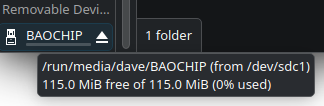
I should be able to just drag UF2 files (USB Flashing Format - a standard for packaging binary program images into 512 byte blocks so they can be written to memory via a virtual file system) to the Baochip to program it.
So now I "just" need to re-learn enough Rust to blink an LED.
After that, who knows? I’m in absolutely no hurry and I have a lot of other projects to complete first.
Anyway, I’ll never stop being enchanted by by the fact that we have computers the size of a grain of rice that cost as much as a bag of rice. That’s way more interesting to me than the brute-force computing currently en vogue.