The Project Stack! (an actual paper stack)
Back to projects or onward to stack-display or Finishing Things (for a much more thorough treatment).
Everybody’s got a "todo" list. They’re okay, I guess. For normal people.
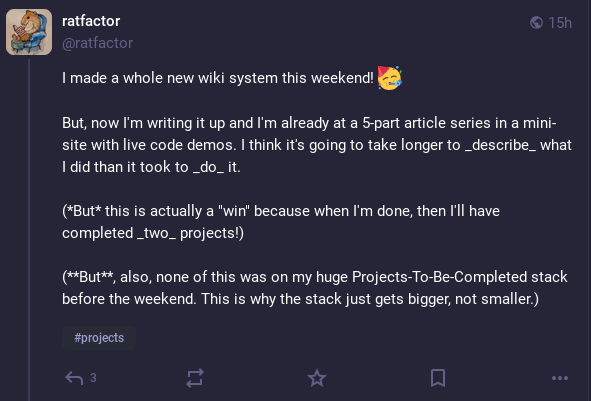
I am not normal people.
That was just the start!
Around 21:30 last night, I found myself hacking on a script to produce images for the documentation mentioned in the screenshot above.
Shortly after, it spiraled out of control.
My situation, in summary:
-
<Existing stack of existing half-completed projects starts here.>
-
"I have a horrendous itch to make that wiki I’ve been thinking about."
-
Make a wiki in a weekend. (Not on my todo list, but, cool, it works!)
-
"Document it or it didn’t really happen…"
-
Make a project page for the weekend wiki.
-
"Oh no, now it’s a five-part article series about the weekend wiki with screenshots and live code demos and stuff! (update: done)
-
For the above articles, start making a script to read the source of a project and create an SVG show the repo’s "shape" (Update: DONE!)
-
"Jeez, re-running script to re-generate output is annoying…"
-
Make a script to watch the script that reads a script and auto-generate SVG
-
"Wow, that had a lot of weird pitfalls. I should document this…"
-
Write an article about making scripts to watch file changes: (here)
-
"Why are these interface screenshots so big? I can do better."
-
Reduce size of screenshots in articles
-
Write another article about small PNGs with reduced colors: (here)
-
"This is too much to store in my head. I know, I’ll make a stack of actual paper to keep track!"
-
Make the paper stack. It works and I like it
-
"This is great! I must tell the world!"
-
Write a card (you’re reading it!) about the paper stack
My stack got way too deep, too fast. I truly could not keep track of what I was doing anymore. Each item on the top of the stack blocked the item below and I was overwhelmed.
I’ve been thinking about these "project stacks" for a while. So this morning, I woke with a silly epiphany: I should make my mental stack into a paper stack. Not a list, but an actual, physical stack.
Here’s the paper stack:
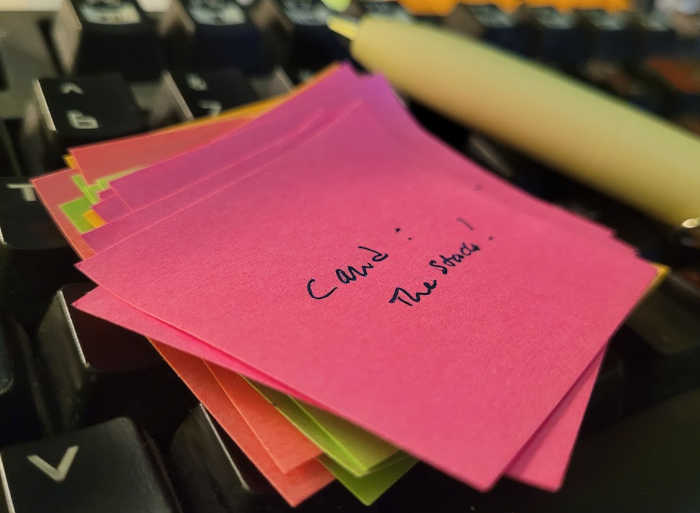
That’s the actual project stack. As you can see, I used colorful mini 3M "Post-it" notes but any scraps of paper would do.
When I have a new thing I need/want to do, I put it on top. When I finish it, I pop it off. Each "pop" reveals the thing that is now unblocked.
Because I only see one item at a time, it’s not like staring at a long "todo" list. This feels way more focused.
This method is genuinely useful for me. I’m "poppin' paper" off my stack this evening by completing this write-up and it feels good!
The one thing I would do differently if I were making this stack from scratch right now is write the title of the item at the bottom edge of each Post-it so I can see them easier when I flip through the stack like a flip-book. (I need reassurance that I’ve already written an item.)
I’d like to say this is unusual, but it’s not. This is why my website grows in fits and starts. One project begets another. Often the documentation for a project begets another project.
Often, conversations about projects begets other projects. You can’t spell "Mastodon" without "todo".
How it’s going
Look, it’s just a handful of days later, but I’m gonna call it: This system works.
Disclaimer: All systems work if you stick with them. All diets will cause weight loss. All exercise programs will give you a workout. All programming systems produce software (yes, including waterfall and…yes, ha ha, even agile). Some systems may be way healthier for you in the long run than others, but all will have an effect. So what is the effect of the paper stack?
Two clear benefits so far:
Focused: As mentioned above, working from the top of the stack means seeing one item at a time, not all the 'todo’s at once.
Adding Feels Deliberate: Putting an item on the stack hides the one below it (which is presumably what I was just in the middle of working on). The feeling of doing this is way different from "just adding another line" to a todo list.
Not a benefit per se, but it is fun "popping" items off the stack and onto a DONE pile. It feels good to finish stuff no matter what system you’re using, but this one actually "unlocks" or "reveals" the next item. It’s like unlocking a door in a video game.
See also
See dozens’s page, which contains a bunch of relevant links:
SOFA (tilde.town) - Start Often Finish rArely
And Sandra’s pages, which pretty much mirror my thoughts exactly:
LIFO vs FIFO (idiomdrottning.org)
…working lifo can sometimes get massively rewarded. Today as I was working on a thing I had dreaded because putting the files that way is such a schlep, I was like "OK, so why don’t I automate it?" … It literally took less time making the automation than to actually do it by hand one time. Conclusion: I’ve got to case-by-case it.
Choosing SOFA (idiomdrottning.org)
"Ultimately, what I want is to be able to finish things to a releasable level."
Check out Peter Fidelman’s Distracked (github.com). It’s a Bash shell script that is basically the digital equivalent of my Post-it note stack. You know this is good software because the README has examples and is considerably longer than the script itself.
From the README:
  As you come up with things to do, add them to the stack.
  --------------------------------------------------------

$ ./dt push Write a readme for dt
$ ./dt push Record a screencast for dt

  "dt" by itself will show you the latest item.
  --------------------------------------------------------

$ ./dt
* Record a screencast for dt
It even has the concept of separate stacks, so you can have a whole side-quest of interruptions. Terrifying. I love it!
Check out Victoria Lacroix’s Stask (codeberg.org), a GNOME GUI stack-based task manager, inspired by this very page. How great is that?
The README makes a brilliant case for the use of stacks for task management.
Sample:
It makes sense to want to do tasks in the order they have been raised, but this ignores the fact that most new tasks are necessarily of higher priority. … A stack is therefore the ideal data structure for holding tasks.
There’s also this post https://vtrlx.ca/w/2026-05-08-stask.html
Stask has been instrumental in helping me finish three outstanding projects (including Stask itself). Being able to erase my existing context with a large task, shadow that one with a smaller item, and break it down piece-by-piece in the moment (rather than ahead of time) is incredibly helpful - I am constantly moving forward.
Exactly!
Alexander Cobleigh made a cardboard organizer for paper card-based stacks! I’m blushing a bit to post this link because it starts with some very kind words about my website, but I think I can manage to get over it, ha ha:
I think this is a great point about the choice of medium:
One benefit of using physical pieces of paper is how effortless it is to work with and change: reorganizing, splaying out all cards, quickly striking things over and amending them, ad-hoc organizing a series of tasks by writing a little label in the top right.
And this precisely sums up the benefits of the system as I see it:
This particular paper-based system is great because of the simplicity and focus (one task only! it’s waiting for you indefinitely until you have the time!) and for how gratifying it is to toss the top most task into the Done stack when I have finished it.
I love, love, love cardboard as a building material and if I didn’t already have my own setup, I would definitely be getting ideas from this one!
See also this card: Do One Thing at a Time!